
Basket composites
This page documents basket submission through the basket composite API family. For all new integrations, this is the recommended path.
Why use basket composites?
#
Basket composites are the recommended long-term direction because they allow MPs to:
- submit standalone baskets and grouped basket structures through one API family
- model looped baskets explicitly with
loopFamilies - submit flexible groups for minimum consecutive service windows rules
- support linked service windows
Basket composite API family
#
The current basket composite mutations are:
- enterBasketsComposite to create or update one basket composite
- enterBasketsComposites to create or update several basket composites in one request
- removeBasketsComposite to remove one basket composite
- removeBasketsComposites to remove several basket composites in one request
Migrating from enterBaskets
#
If you are migrating an existing integration from enterBaskets to enterBasketsComposite , the basket structure itself remains mostly unchanged. The main differences are the grouping fields around it. If you need to enter, update, or clone several basket composites in one operation, use enterBasketsComposites . If you need to remove several basket composites in one operation, use removeBasketsComposites .
baskets
argument of enterBaskets
baskets
familyName
loopFamilies
item
null
or empty lists for unused arguments
Looped families
#
A Looped Family is a grouping of baskets looped together. This means those baskets must be accepted altogether or not at all. Only baskets of the same unit and on non-overlapping service windows can belong to a looped family.
For the input for the baskets, refer to the Create baskets page. The same basket input logic applies as for the enterBaskets mutation.
When you use loopFamilies
, the loop relationship is expressed by the composite structure itself.
You do not need to set a familyName
to make the baskets part of the same looped family.
Flexible groups
#
A Flexible Group is a grouping of consecutive baskets with a minimum up-time condition. This means that the baskets must be accepted for a minimum number of consecutive service windows or not at all.
For example, the following inputs request the creation of two flexible groups.
The first one requires that baskets be selected for at least four consecutive service windows. If the group contains six consecutive baskets, any of the following selections would be acceptable:
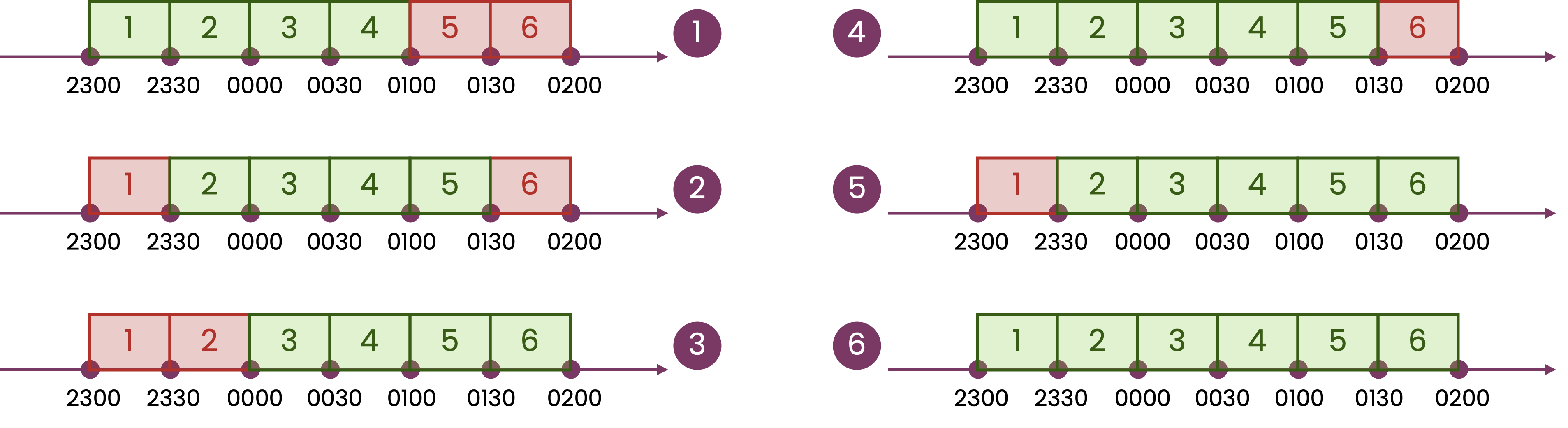
Baskets of a flexible group must have the exact same structure (parent and child orders) and volumes for all services, but prices can differ.
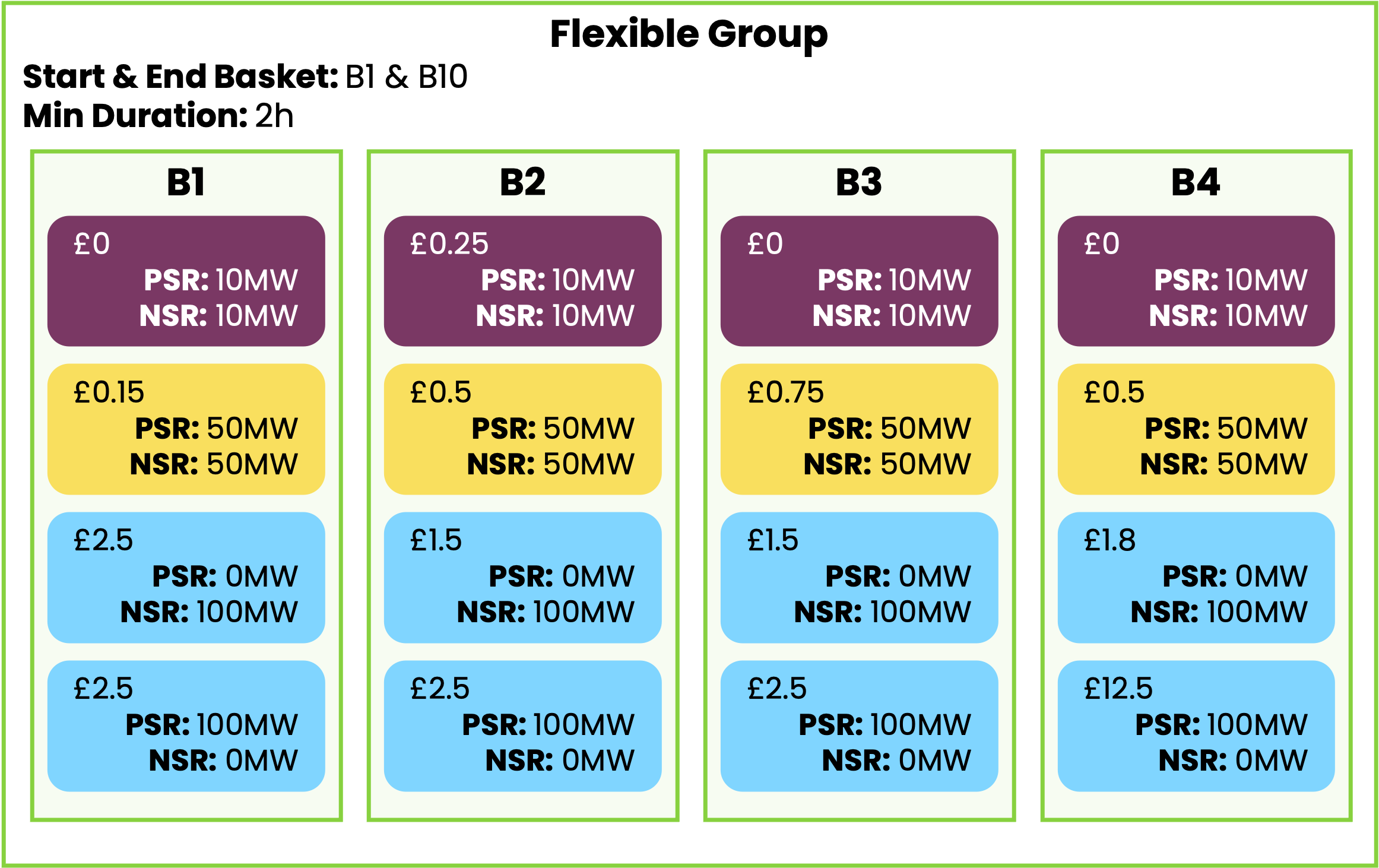
When accepted, baskets will be accepted at a constant volume over the flexible group. Only one consecutive set of baskets can be selected in a flexible group.
For the input for the baskets, refer to the Create baskets page. The same basket input logic applies as for the enterBaskets mutation.
Example
#
A basket composite can also combine standalone baskets, looped families, and flexible groups in the same request.
Slow Reserve Example
#
Slow Reserve is a common case where basket composites are required.
When a service type has a minimum consecutive service windows rule, baskets must be submitted inside flexibleGroups
.
The following example creates a single flexible group for Positive Slow Reserve. Unused arguments are omitted.
Query Structure
#
When calling the enterBasketsComposite mutation, you can provide any combination of Individual baskets , Looped families and/or Flexible groups . Please observe the following structural rules to avoid validation errors:
- At least one argument is required: You must populate at least one of the following:
baskets,loopFamilies, orflexibleGroups. - Omit unused arguments: Do not pass empty lists or null values for arguments you are not using. For example, if you are only submitting flexible groups and individual baskets, completely omit the
loopFamiliesfield from your query.
Validations
#
The EAC is performing validations to ensure the baskets comply with market rules.
Most of the validation rules are directly explained field by field in the GraphQL reference, see BasketInput for the specifics on basket creation.
The validation rules explained in the Create baskets page apply to the baskets in a composite as well.
Linked Service Windows
#
If NESO links service windows for a given service, additional validation rules are applied when submitting baskets. Refer to Impact on baskets submission for more information.
Troubleshooting
#
Common issues include:
- Using the wrong mutation: if the service requires linked service windows or minimum consecutive service windows, use
enterBasketsComposite, notenterBaskets. - Using the wrong service externalID: for example, for Slow Reserve use
Positive Slow ReserveorNegative Slow Reserve, notSlow Reserve. - Passing unused arguments as
null: omit unused arguments entirely. - Keeping
familyNamewhile switching to composite grouping: when usingloopFamilies, model the grouping explicitly in the composite structure.
If you receive a validation error and are unsure whether it comes from the basket content or from the grouping structure, first reduce the request to the smallest valid example for your use case, then add the remaining baskets gradually.
Update a basket composite
#
When you create a basket composite, the EAC GraphQL API will assign a unique id to the composite. This id can be returned by the enterBasketsComposite mutation as shown in the basket composite creation section.
Use the enterBasketsComposite mutation to update an existing basket composite. It works the same way as for creating a new basket composite, except that you provide the id of the composite to update. This operation completely replaces the existing composite. All baskets belonging to the old composite will be deleted, and a new composite will be created with a new ID.
Enter several basket composites
#
If you want to create or update several basket composites in one request, use the
enterBasketsComposites
mutation.
Each item of the basketsComposites
array follows the same structure as the inputs used by
enterBasketsComposite
.
Delete a basket composite
#
If you want to delete all baskets of a composite, use the removeBasketsComposite mutation. Simply provide the unique identifier of the basket composite you wish to delete.
Delete several basket composites
#
If you want to delete several basket composites in one request, use the removeBasketsComposites mutation. Simply provide the list of basket composite identifiers to remove.
Standalone baskets
Co-optimised baskets